
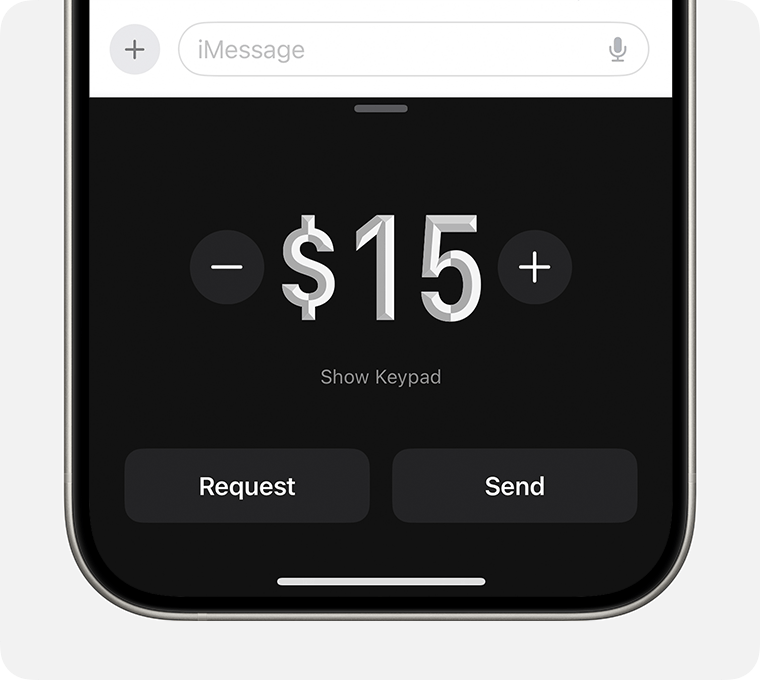
Apple makes it easy for iPhone users to send and receive money directly within the Messages app using Apple Cash. Instead of switching between banking apps, you can pay friends or family during an iMessage conversation in just a few taps.
If you’re wondering how to send money via Apple’s iMessage, here’s everything you need to know, including eligibility requirements, setup instructions, and troubleshooting tips.
What Is Apple Cash?
Apple Cash is Apple’s peer-to-peer digital payment service that lets users send and receive money securely through the Wallet app and iMessage. Payments are encrypted and authenticated using Face ID, Touch ID, or your device passcode.
Funds received through Apple Cash can be:
- Stored in your Apple Cash balance.
- Used for purchases with Apple Pay.
- Transferred to a linked bank account.
- Sent to another Apple Cash user.
Can You Send Money Through iMessage?
Yes. If both you and the recipient have Apple Cash set up, you can send money directly within an iMessage conversation.
The process typically takes less than a minute.
Requirements to Use Apple Cash
Before sending money through iMessage, make sure you meet the following requirements:
- An iPhone or iPad compatible with Apple Cash.
- An Apple Account signed into iCloud.
- Apple Cash configured in the Wallet app.
- Two-factor authentication enabled.
- Both sender and recipient must be located in the United States.
Apple Cash is currently available only to eligible users in the U.S.
How to Send Money Through iMessage
Follow these simple steps:
- Open the Messages app.
- Select the conversation with the person you want to pay.
- Tap the + button beside the message field.
- Choose Apple Cash from the available apps.
- Enter the amount you want to send.
- Tap Pay.
- Confirm the payment using Face ID, Touch ID, or your device passcode.
Once approved, the payment is sent immediately.
How Does the Recipient Receive the Money?
If the recipient already has Apple Cash set up, the funds are deposited into their Apple Cash balance automatically.
If they haven’t activated Apple Cash yet, Apple will guide them through the setup process before they can accept the payment.
What Happens if Apple Cash Doesn’t Appear in iMessage?
If you don’t see the Apple Cash option, try the following:
- Verify Apple Cash is enabled in Settings > Wallet & Apple Pay.
- Complete Apple Cash setup in the Wallet app.
- Update your iPhone to the latest version of iOS.
- Confirm that both users are located in the United States.
- Check whether Screen Time or parental controls are restricting Wallet features.
Can You Send Money Using a Credit Card?
No. Apple Cash does not allow users to send money with a credit card.
Instead, payments can be funded using:
- Your Apple Cash balance.
- A linked debit card.
- A connected bank account, depending on your Apple Cash settings.
Is Sending Money Through iMessage Secure?
Yes. Apple Cash transactions are protected by Apple’s security features, including:
- End-to-end encryption for iMessage conversations.
- Face ID or Touch ID authentication.
- Device passcode verification.
- Fraud monitoring and transaction protections.
These features help ensure that only the authorized user can complete a payment.
Frequently Asked Questions
Can I send money through iMessage internationally?
No. Apple Cash is currently available only in the United States.
Does it cost money to send Apple Cash?
Most Apple Cash person-to-person transfers are free when funded by your Apple Cash balance or an eligible debit card.
Can I cancel an Apple Cash payment?
If the recipient hasn’t accepted the payment yet, you may be able to cancel it. Once a payment has been accepted, it generally cannot be reversed.
Can I use Apple Cash on an iPad?
Yes. Apple Cash works on compatible iPads that support the feature and are properly configured.
Final Thoughts
Apple Cash offers one of the fastest and most convenient ways for iPhone users to send money without leaving an iMessage conversation. With secure authentication, seamless Wallet integration, and instant transfers between eligible users, it’s an easy solution for splitting bills, paying friends, or reimbursing family members.
As long as both users have Apple Cash set up and meet the eligibility requirements, sending money through iMessage takes only a few taps.
One thought on “How to Send Money Through Apple’s iMessage Using Apple Cash”
That’s a really handy tip. I’ve heard it’s much faster than using a banking app for small transfers.